v2.23 kess v2 fw 7.020 ECU programmer

Showing posts with label diagnostic software. Show all posts

Tuesday, 13 September 2016

BMW E-Sys software Read I-Step Current from VCM

Here is a manual of how to read F series I-Step from VCM master, using BMW E-sys software.

The I-Level (aka I-Step) is the Integration Level of your car, which represents a package of firmwares for all your modules, and it corresponds to the version of ISTA/P last used to program your vehicle.
To determine your I-Level, go to VCM Module => VCM Master Tab => click Read under I-Steps:


The I-Step (current) is the one you want to match when you select the CAFD from the Detect CAF for SWE options (e.g. F001-08-09-550):

When you lost power in the middle of FDL Coding your CAFD, it became corrupted. What I am having you do is insert the same CAFD in it's default generic state and then coding it based on your specific Vehicle Order (Production Date and Option Codes) so in the end you will have exactly what you started with before the power failure and CAFD corruption.
As I have repeatedly stated, so long as one isn't coding the DME module, you should code with the engine running, and will you never have to worry about loosing vehicle power mid-coding, unless of course you run out of gas.

Sunday, 24 April 2016

How to install ETKA 7.4 Electronic Catalogue on WIN 7/8/10

It’s aimed to help install V7.4 ETKA Electronic Catalogue, which contains the full information on spare parts and accessories (separately the catalogue of accessories Audi,VW,Seat,Skoda on CD more is not issued) for cars of concern VAG, including minibuses.

First, to get V7.4 ETKA Electronic Catalogue For Audi VW Seat Skoda here:
http://www.obdexpress.co.uk/wholesale/audi-vw-seat-skoda-etka-electronic-catalogue-v74-multi-language-3169.html (Never Expire!)
Many ETKA Electronic Catalogue, even free on webs, but i don’t recommend those because most of them may be expire in the near future.

The reported problem is, that two of the displayed installation steps
have a wrong representation in some versions of Windows 7/8/10.

STEP 1: Choose ETKA Variant:
STEP 2: Choose ETKA Version:
Note: Please look at the "right representation" picture for your decision

STEP 3: Welcome window:
STEP 4: "Version to install" window:
STEP 5: Installation Summary window:
STEP 6: Choose install target folder:
Note: Please look at the "right representation" picture for your decision
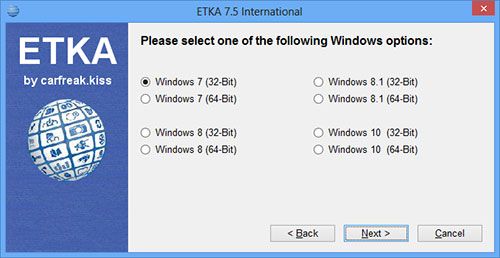
STEP 7: International Version window:
STEP 8: Installation process:
STEP 9: Hardlock Driver Installation:
After ETKA installation finished the hardlock driver installation is initialized.
Here you can/must follow the displayed installation steps.

I hope this guide is helping you, to install ETKA Electronic Catalogue for AUDI VW Seat Skoda.