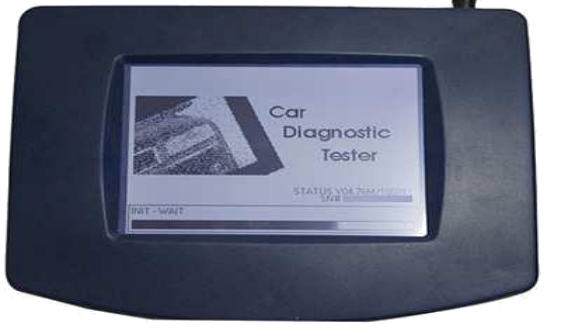
Hello, guys. I made a small intruction here for you all on how to correct or change the mileage of Chevrolet Trailblazer using Digiprog 3 odometer programmer.
Disclaimer:
The guide is only for educational purposes and not by any means to be wrongly or criminally used for cheating or manipulating with cars mileage for sales purposes
Tool used:
Digiprog 3 v4.88+ st01/2 adapter
Model:
Chevrolet Trailblazer LTZ 2002
Here are my steps to change km:
connect serial port cable first then AC adapter
plug to the Digiprog 3 unit, then power it up
press the tick button to continue
press 1 for the password and press the tick button
choose EEPROM to read the chip
choose EEPROM-> READ
choose 95
choose s 95020
reading the chip
chip data
choose FILE-> SAVE, incase that something goes wrong
name the file and press the tick button to save
disconnect the power and restart Digiprog 3 to check the file
connect AC adaoter and plug again to start the unit
unplug the serial cable to verify the saved file and make sure that the unit is reading from saved file (NOT directly form the chip)
press the tick button
press 1 for the password and press the tick button
choose EEPROM
choose FILE-> SHOW, to open the list of saved chip data files
choose the saved file with the name
the old chip data is fine, then proceed (DELETE, then cross button)
unplug
connect to the chip
restart Digiprog 3
choose CAR/TRUCK
use up and down arrows to choose CHEVROLET->TRAILBLAZER
make sure the serial cable is connected in a right way
press the tick button to start reading the chip data
OLD mileage written in the top right corner and put the new mileage and press the tick button to write on the chip
Done!
Note:
- always save the old chip data in the Digiprog 3 programer for any thing goes wrong so you can write it back if needed or even if someone fried his chip and needed to install new chip it will be really easy to write it back
- if you needed any time to restart again or your Digiprog3 got stuck while working simply take out the Power plug and reinsert it again to restart the programmer (Never ever unplug AC power Plug when odometer correction tool is reading or Writing on the EEPROM CHIP otherwise you will destroy it)
Showing posts with label digiprog III device. Show all posts
Wednesday, 13 April 2016
Tuesday, 16 February 2016
How to repair Digiprog 3 update failure- a blue screen
This is an ideal solution to fix Digiprog 3 (blue screen) after a upgrade failure. It has been tested ok by many users, especially the old Digiprog 3 owners updating 4.94 software themselves.
NOTE: you may be at risk to try this if not experienced enough.
1. Reasons of a blue screen.
a) inappropriate update for Digiprog 3. (the most common cause)
We must remember that updates are created for the serial number. The serial number of the update files must be Digiprog 3 serial number. Otherwise, upload the files to another serial number gives us the effect shown in the picture above.
b)interrupted during the upgrade of communication between PC and the digiprog III device.
c)Other causes: unrelated to update the device
2. How to fix the DIGIPROG 3 mux after a failed update.
To repair the unit, you need:
a) Update files with the corresponding serial number = serial number of the device.
b) Programmer serial memory for example, willem.
Ok, so we begin. We will have 3 digiprog undress and get into the PCB, exactly 2 serial memory.
You will see a such a view:
Us interested, memory, marked in the picture above. Are respectively a memory U1A and U2A. These are the memories that are 22, feet on one side, which is 44, feet the entire memory. We remove the memory U1A from the plate and put in the programmer.
Load a file content digi1.bin, to memory U1A.
Then again put memory on the board.
Do the same with memory U2A. Only here to load file Digi2.bin
Then again put memory U2A on the board.
Preferably before each update, do yourself a copy memory dumps U1A and U2A. Then we can go back in case of problems with the update to the old version.
Twirl, back digiprog. After this step, run digiprog. If everything went well that you will be greeted this image
ps.
This is offered by VR-6 at mhhauto.com
For more possible solutions, please go to http://obd2-diag.blogspot.com/2015/11/how-to-solve-digiprog-3-iii-v494-blue.html
NOTE: you may be at risk to try this if not experienced enough.
1. Reasons of a blue screen.
a) inappropriate update for Digiprog 3. (the most common cause)
We must remember that updates are created for the serial number. The serial number of the update files must be Digiprog 3 serial number. Otherwise, upload the files to another serial number gives us the effect shown in the picture above.
b)interrupted during the upgrade of communication between PC and the digiprog III device.
c)Other causes: unrelated to update the device
2. How to fix the DIGIPROG 3 mux after a failed update.
To repair the unit, you need:
a) Update files with the corresponding serial number = serial number of the device.
b) Programmer serial memory for example, willem.
Ok, so we begin. We will have 3 digiprog undress and get into the PCB, exactly 2 serial memory.
You will see a such a view:
Us interested, memory, marked in the picture above. Are respectively a memory U1A and U2A. These are the memories that are 22, feet on one side, which is 44, feet the entire memory. We remove the memory U1A from the plate and put in the programmer.
Load a file content digi1.bin, to memory U1A.
Then again put memory on the board.
Do the same with memory U2A. Only here to load file Digi2.bin
Then again put memory U2A on the board.
Preferably before each update, do yourself a copy memory dumps U1A and U2A. Then we can go back in case of problems with the update to the old version.
Twirl, back digiprog. After this step, run digiprog. If everything went well that you will be greeted this image
ps.
This is offered by VR-6 at mhhauto.com
For more possible solutions, please go to http://obd2-diag.blogspot.com/2015/11/how-to-solve-digiprog-3-iii-v494-blue.html
Subscribe to:
Posts (Atom)