v2.23 kess v2 fw 7.020 ECU programmer

Friday, 26 August 2016

How to use OBDSTAR X100 change KM on Mercedes-Benz ML S350

This is the DIY instruction on Mercedes-Benz ML S350 2011 year odometer correction by using OBDSTAR X100 Pro auto key programmer.

Here has three choice

SK164: X100 PRO C+D Type: Immobilizer + Odometer + OBD functiion
SK164-B: X-100 PRO C Type for IMMO + OBD Function
SK164-C: X100 PRO D Type for Odometer + OBD Function

BTW,OBDSTAR X300M can change Mercedes-Benz ML S350 2011 KM as well,The blue case X300 Pro key programmer is the domestic X100 Pro which adds some Chinese car models. They perform same functions. And OBDSTAR X-100 Pro have several configurations, if you need to adjust mileage,make sure you get the correct package.

Odometer correction procedure:
current mileage: 103744 km
 X-300-PRO-20111

connect obdstar x100 to the car
turn ignition on
make the x-100 pro start
select VEHICLES-> MILEAGE ADJUSTMENT-> BENZ-> BENZ V30.00

X-300-PRO-2011-2
X-300-PRO-2011-3

X-300-PRO-2011-3

X-300-PRO-2011-3

initializing…
authorizing…
select ML-> S164
X-300-PRO-2011-8

X-300-PRO-2011-9

input the mileage of the adjustment: 131030
X-300-PRO-2011-10

X-300-PRO-2011-11

communication…
calibration is successful
disconnect the insurance, on the insurance-after 5 s(seconds)!
X-300-PRO-2011-13

X-300-PRO-2011-14

X-300-PRO-2011-15

X-300-PRO-2011-16

now, the corrected mileage: 131008 km
X-300-PRO-2011-17

Done!
SOURCE:http://blog.obdexpress.co.uk/2016/08/26/obdstar-x100-change-km-on-mercedes-benz/

Tuesday, 9 August 2016

Special VAG CAN PRO CAN BUS+UDS+K-line S.W Version 5.5.1 VCP Scanner

This VAG CAN PRO support CAN BUS + UDS + K-Line for diagnostics and programming of electronic components used in vehicles Volkswagen, Audi, Seat, Skoda, made from 1990 to 2015.
New in version 5.5.1 VCP Scanner:
 VAG CAN PRO CAN BUS+UDS+K-line S.W Version 5.5.1 VCP Scanner

Support for new addresses entered in the MLB-Evo platform
Update database-ODX (support for all models 2015)
What features does VAG CAN PRO  have?
* Unique features OCLF service procedures (One-Click-Function);
* inexpensive flasher for VAG;
* inexpensive flasher with support UDS controllers;
* ESP MK60EC1 decision coding blocks;
* a tool for a complete diagnosis MQB platform (Golf VII, Octavia III) Support to 01.2013;
* ZDC-loading containers in the electronic components;
* Unlock video in motion (VIM) on the MQB platform (Discover Pro and MMI-MQB);
* Coding controllers for PR-codes;
* "Login finder" - allows you to scan and logins in the CAN controllers UDS;
* Support for the new Polo in 2014 Facelift;
* Support for the new Passat B8;
* Full support of Audi TT-3 on the platform of the IBC;
* Full support for Skoda Fabia III
This contributes to a more stable connection when connected directly to the ECU (Direct Connect), popular among fans VAG
 VAG CAN PRO CAN BUS+UDS+K-line S.W Version 5.5.1 VCP Scanner

VCP Scanner Supported cars:

1. Audi

A2 2009-
A3 8P 2003-
A3 - platform MQB-
A4 model 8E wariant B7 (Engine, transmission, airbags, ABS, park) 2005-
A4 model 8K wariant B8 (UDS + TP2.0) 2008-
A5 model 8K (UDS) 2007-
A6 model 4F 2004-
A8 model 4E 2003-
Q3 (UDS) 2010-
Q5 (UDS) 2008-
Q7 (TP2.0 + UDS) 2006-
S5 model 8K
(R)S6 model 4F
R8 (UDS)
TT model 8J 2007-
2. Mercedes
Sprinter (VW Crafter) - - Only the engine and immobilizer
3. Seat
Altea
Leon MQB 2013-
Leon model 1P 2005-
Toledo model 5P 2004-
Exeo 2008- (Engine, transmission, airbags, ABS, park)
4. Skoda
octavia model 1Z 2004 -
octavia platform MQB -
superb II B6 2008-
fabia model 5J 2007-
yeti 2009-
5. Volkswagen
Crafter (immobilizer, engine)
Caddy model 2K 2005-
Eos
Golf V model 1K
Golf VI model 5K
Golf VII platform MQB
Golf Plus
Jetta II model 1K
Transporter / Multivan (Only after the CAN-BUS drive for storing data)
Multivan/Transporter GP model 7E (UDS) 2009-
Passat B6 model 3C 2005-
Passat CC-
Phaeton GP 2007-
Polo model 6R 2009-
Polo FL MQB 2014-
Scirocco III-
Touran-
Tiguan-
Touareg GP 2007-
Touareg NF 2010
Notes for Audi A4
1. Option A4 8E B6 model
This model has a can-bus (TP1.6), but it is not connected to the diagnostic socket. The car is fully diagnosed on the K-line (VCP required interface + K). Used protocols KWP2000 and KWP1281 it.
2 .Model A4 8E, B7 option
This model has a CAN BUS TP2.0, but the diagnostic socket is only connected to the so-called CAN-Antrieb, i.e. Engine, transmission, airbags, ABS, Quattro drive.
In addition, a standard K-line. In other words, VCP fully supports the diagnosis B7 models, but only in the CAN-Antrieb. Other controllers are available through the K-Line and KWP2000 KWP1281 protocols.

Monday, 8 August 2016

How to use OBDSTAR X300 PRO to change mileage on Volvo S80

Here's a successful test of  mileage adjustment on Volvo s80 ’2008 
Starting.....
km before adjustment: 535220km

obdstar-x300-pro3-volvo-s80-obdexpress.co.uk

first, select the model: volvo s80 2008
check the connection of x300 pro3 and the car
obdstar-x300-pro3-volvo-s80-obdexpress.co.uk

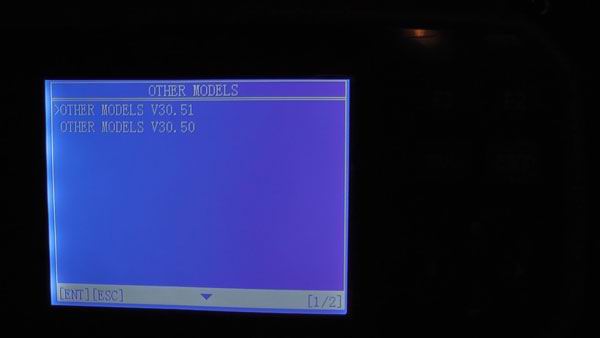
select VEHICLES->MILEAGE ADJUSTMENT->OTHER MODELS->OTHER MODELS V30.51->VOLVO->S80->->07-
obdstar-x300-pro3-volvo-s80-obdexpress.co.uk

obdstar-x300-pro3-volvo-s80-obdexpress.co.uk

obdstar-x300-pro3-volvo-s80-obdexpress.co.uk

obdstar-x300-pro3-volvo-s80-obdexpress.co.uk

obdstar-x300-pro3-volvo-s80-obdexpress.co.uk

obdstar-x300-pro3-volvo-s80-obdexpress.co.uk

obdstar-x300-pro3-volvo-s80-obdexpress.co.uk

obdstar-x300-pro3-volvo-s80-obdexpress.co.uk

obdstar-x300-pro3-volvo-s80-obdexpress.co.uk


then, change mileage
select Mileage adjustment
obdstar-x300-pro3-volvo-s80-obdexpress.co.uk

switch ignition on, then switch ignition off


obdstar-x300-pro3-volvo-s80-obdexpress.co.uk

obdstar-x300-pro3-volvo-s80-obdexpress.co.uk

OBDSTAR X300 PRO3 is reading mileage...
obdstar-x300-pro3-volvo-s80-obdexpress.co.uk

input the name of file to save: 12300000
obdstar-x300-pro3-volvo-s80-obdexpress.co.uk

then the system displays the input value
X300 PRO3 reads the current mileage: 53520km, confirm to go on
obdstar-x300-pro3-volvo-s80-obdexpress.co.uk

input the new mileage: 73520
obdstar-x300-pro3-volvo-s80-obdexpress.co.uk

OBDSTAR X300 PRO3 is adjusting the mileage
obdstar-x300-pro3-volvo-s80-obdexpress.co.uk

obdstar-x300-pro3-volvo-s80-obdexpress.co.uk


after operation success, then dashboard displays the new mileage also.
obdstar-x300-pro3-volvo-s80-obdexpress.co.uk
Done!

Wednesday, 27 July 2016

Checksum Family Manual for ECM Titanium v1.61

What is Checksum?
Checksum is the security algorithm with which are encoded files stored inside the engine control units; if the modified files you are tuning, it wasn’t signed with the correct Checksum algorithm, and the ECU will be blocked.

It is very important to know whether the device used for program the tuned file to the ECU already running CheckSum or not; Some ECU tuning tools, like Kess V2 and Ktag, are developed to calculate the CheckSum and you don’t need to buy the same Checksum family also for ECM Titanium.

Why you need Checksum Family?
To correct the Checksum of modified file using the new ECM Titanium, you must have the Checksum Family for that particular ECU.

What will happen if you don’t choose the right Checksum family?
Once you have selected the Driver for tuning the original file, the software will notify you if the ECM DataBase contains the Checksum family needed for signing the modified file. If you haven’t the right Checksum family software will shows the following message:
Checksum algorithm not available - a file with no checksum changes will be created
If the message appeared, the software will return to the main window and the CheckSum Family box, in the Selected Driver panel, will be colored in red and will present the number of CheckSum Family to download.
Where is the CheckSum Families?
To find out which CheckSum Families are in your ECM Titanium, you just
go in the main software window,
choose the menu Tools,
choose Checksum,
then click on Available Checksum
a new window will open with the list of Available Checksum Families:

available families that are stored on the USB dongle are colored green
ALL checksum families available in this cracked ECM TITANIUM 1.61
Note:
Some free versions or uncracked version on the web cannot offer all checksum families available
those in red are not present

How to download a new Checksum family from Internet?
You don’t connect to the Internet to download a new Checksum family on your own. All checksum families are available in ECM TITANIUM 1.61 at http://www.obdexpress.co.uk/

Sunday, 24 July 2016

How to update TCSCDP 2014.3 to TCS CDP pro 2015.3

This is the instruction on how to update TCSCDP 2014R3 to TCS CDP pro+ 2015R3, for 12v & 24v cars and trucks diagnosis.
If you want to update TCS CDP from v2014 to v2015, do as follows:
Step 1 - download all TCS CDP patch files to your computer.
Step 2 - Goggle for CDP software installation instruction
        You also can refer to http://goo.gl/EldukV (2014 version installation)
Step 3 - skip "DSCars_HeavyDuty_R32014" installation, follow the left steps to operate.

As shown in the "README to install 2014.1-100251.txt", there are only three steps to follow :
1) Delete the existing "data" folder. Copy all file in 2015.3 patch folder.
   replace to the install path (eg c:\program files\Delphi diagnostics\...(new vci).
2) RUN "..(new vci)" on desk and activate.
3) after active, close the ...(new vci), copy "data" in multi-lang DATA replace to the installation path.

If you have neither working TCS CDP nor Multidiag pro, and you want 2015.3 software,
2015.R3 TCSCDP Pro+ with Bluetooth 
2015.R3 TCS CDP+ PRO without Bluetooth
(New Design) v2015.3 TCSCDP Pro+ OBD2 scanner without Bluetooth
(New design) 2015.R3 TCSCDP Pro with Bluetooth and 4G Memory Card
Notes:
Please disable/uninstall anti-virus software before download this software!
Please note,anti-virus software can flag up this product software as having a virus. This is a false positive and is due to the software containing the application file like .exe. So Before setup the device software, please disable/uninstall anti-virus software or install a more reliable virus scanner! The product software is completely safe and virus free and all other virus scanners confirm this.

Tuesday, 19 July 2016

[tip] Read BMW F-series EDC17C41 using KTAG clone

Here are some tips of “reading error” for you when reading EDC17C41 DDE8 520d F10 ecu with Ktag clone, offered by experienced users.

TRY OWN YOUR OWN RISKS!!

Tip 1 - replace oscilator near the nxp processor on ktag board
Tip 2 - need boot and 2 rainbow cable yellow and orange and you have placed the yellow and orange on the wrong spot
1.GREEN-CAN L
2.ORANGE-VKEY
3.YELLOW-K LINE
4.ORANGE-VKEY
5. RED-VECU
6.BLACK-GND
7.BLACK-GND
8.PURPLE-VPP
9.RED-VECU
10.WHITE-CAN H

Tip 3- to rework ktag hardware is necessary with good component, buy too necessary good power supply
Tip 4 - ECU tuning tools for reading BMW F-series EDC17C41
Ktag v6.070 --> YES
Need rework hardware to read EDC17C41 as tips above say
KTM100 v7.003--> YES
BMW ecu EDC17C41 is newly added in KTM100 fw: v7.003
FGTech--> Risky to try!
ECU EDC17 C41 - TC1797 Internal Flash

Kess V2--> NO!!
Kess v2 can’t read and write this type of ECU (EDC17C41), ECUs on the same car model in different areas are sometimes encrypted in different ways, and therefore the tool cannot always work on the same car model.


NOTE:
WE’RE NOT RESPONSIBLE FOR ALL YOU WILL TRY.
GOOD LUCK.